Engineered for macOS. Crafted for focus.
A comprehensive architectural breakdown of how Layr organizes your workspaces, tracks multi-monitor hardware, automates window placement, and respects native macOS system boundaries.
Saved layouts. Applied in milliseconds.
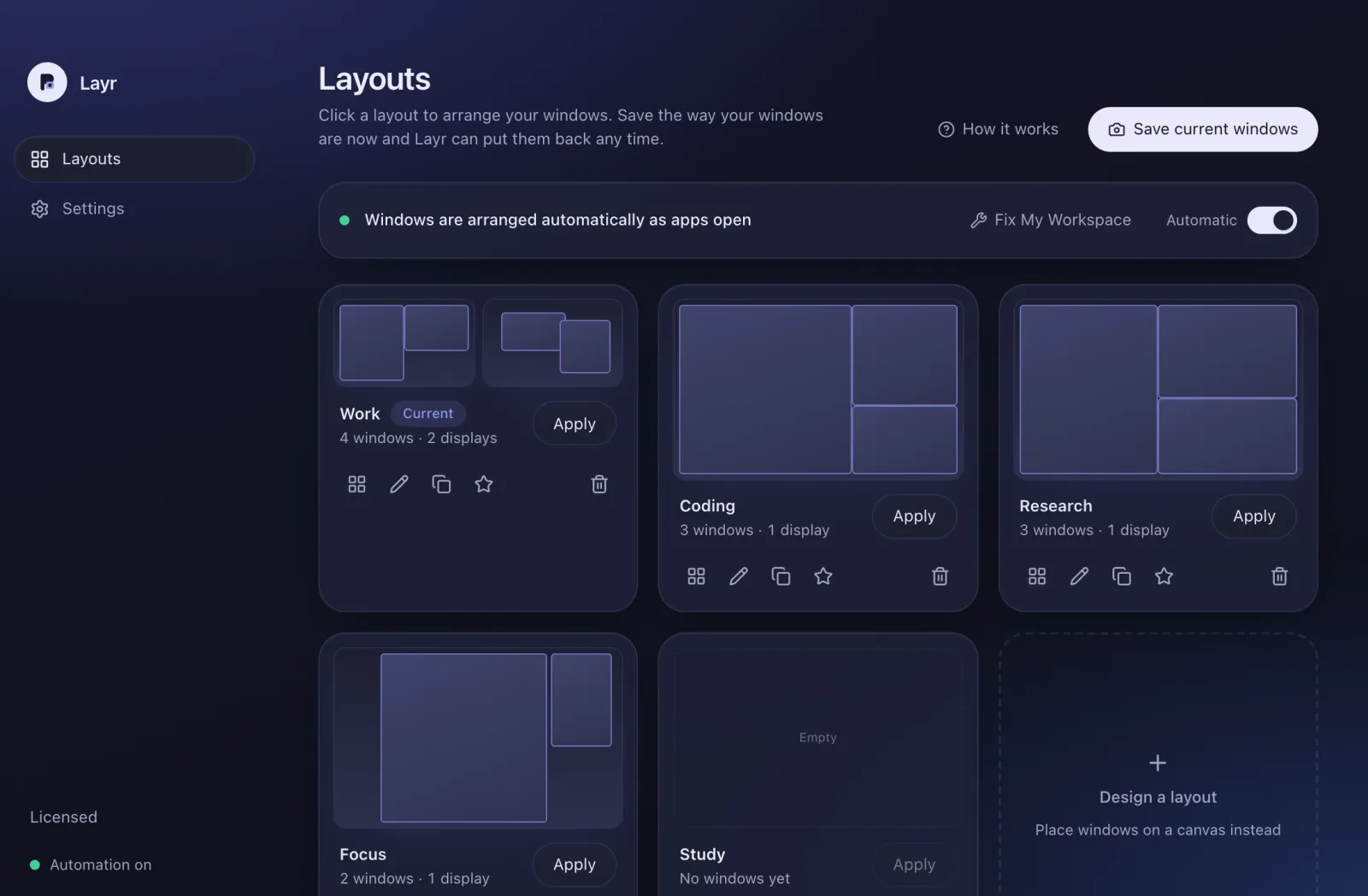
A Layr layout is a structured set of coordinate tiles. Each tile binds an application to a target display and an exact pixel rectangle. Clicking a layout or pressing a hotkey positions every window instantaneously.
Save Current Windows in One Click
Arrange your displays manually once. Layr reads open windows across every connected monitor and creates a saved loadout instantly, complete with bundle identifiers and coordinate frames.
Visual Canvas & Custom Geometry
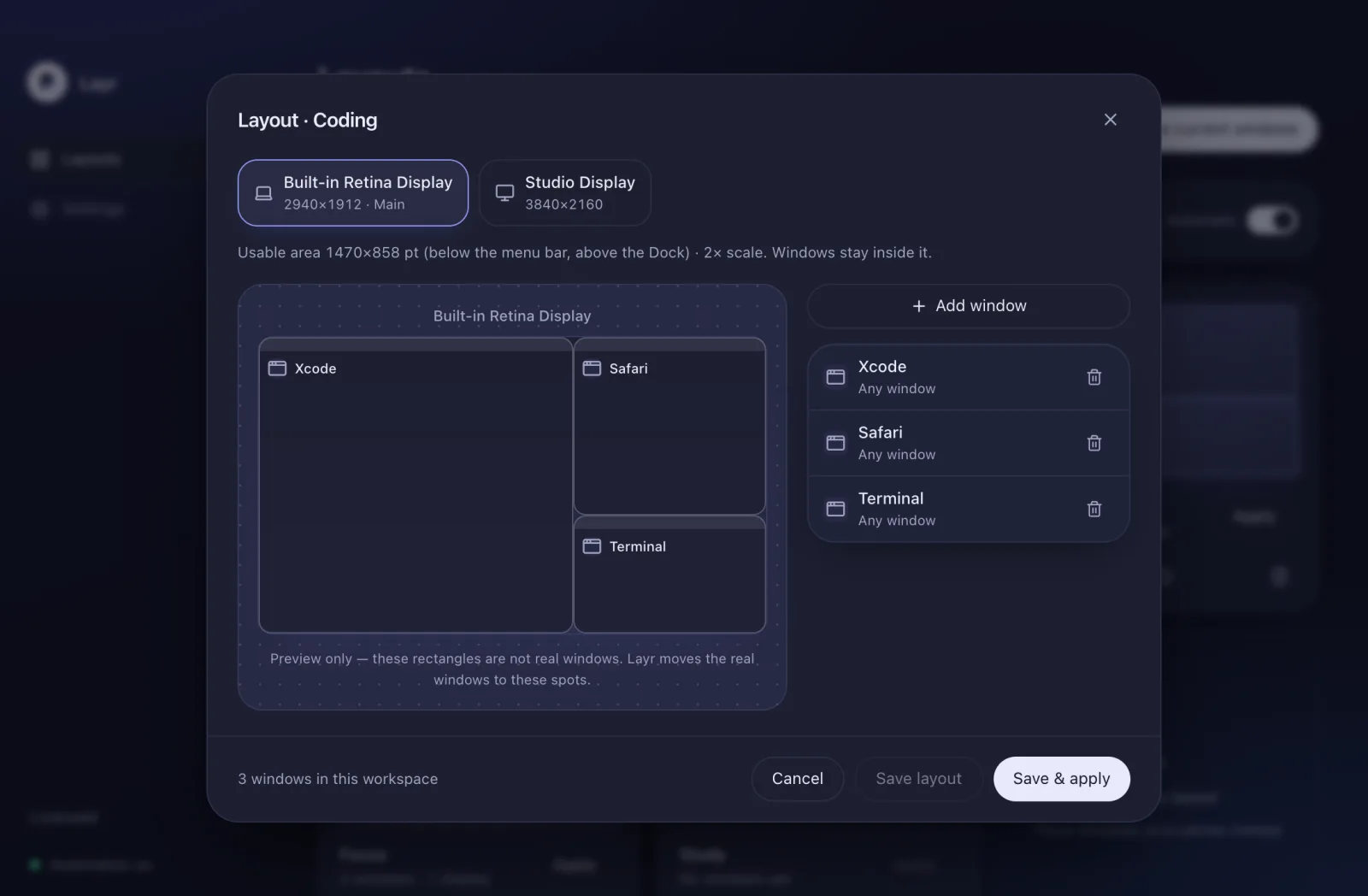
Drag, resize, and fine-tune tiles on an interactive desktop preview. Snap tiles into halves, thirds, columns, or exact floating dimensions with keyboard precision.
Starter Templates Out of the Box
Includes preconfigured starter layouts for Work, Coding, Deep Research, and Focus, ready to adapt to your preferred tools.
Match by app. Filter by window title.
Window layout utilities often struggle when an application has multiple windows open. Layr solves this with a deterministic priority system that pairs each tile to the right window every time.
Exact & Substring Title Matching
Assign one tile to a browser window titled “Project Dashboard” and another to “Documentation”. Tiles with specific title rules claim their windows first, avoiding ambiguity.
Multi-Window Applications
Create two side-by-side tiles for the same application (e.g., two Terminal sessions or two Finder windows). Layr assigns different open windows to each tile without collisions.
Safe Boundary: Unmatched Windows Stay Put
If a window doesn’t match any configured tile or title rule, Layr leaves it untouched. It will never move background tasks or unrelated documents without your consent.
Two ways to switch. Zero window clutter.
You shouldn’t have to open a heavy application window just to re-align your screens. Layr provides two lightweight, native interface entry points built directly into macOS.
Layr Island
A dynamic, floating loadout changer hugging the camera notch on modern MacBooks or resting discreetly at the top edge of external monitors.
- Zero-Travel Switching: Hover or click the notch island to switch loadouts in a split second.
- Live Status Indicator: Displays the active workspace name with animated placement verification.
- Configurable Auto-Hide: Vanishes automatically after positioning or remains pinned as a status capsule.

Menu-Bar Quick Panel
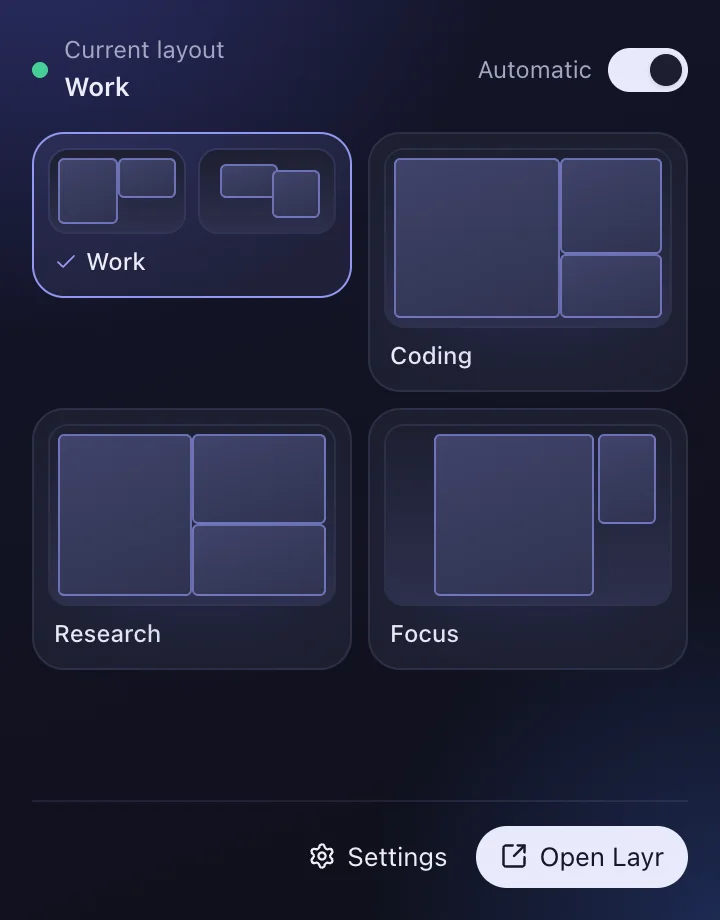
Click the Layr icon in the menu bar to open a compact control panel showing real-time window placement status and thumbnail wireframes.
- One-Click Layout Wireframes: Visual previews of your saved screen setups across all connected monitors.
- Automatic Toggle: Pause or resume automatic window placement on app launch with a single switch.
- Quick Fix & Undo: Re-verify workspace assignments or restore previous window coordinates in one click.
Displays tracked by hardware UUID. Never confused.
Most window managers identify monitors by display index (e.g. Screen 1 vs Screen 2), which shuffles whenever cables are unplugged or arrangements shift in macOS System Settings. Layr binds every tile to native hardware identifiers.
Persistent macOS UUIDs
Displays are registered using their persistent hardware UUIDs. When you undock your MacBook for a meeting and plug it back in later, Layr recognizes each monitor and restores your window arrangement reliably.
Disconnected Display Fallback
When an external monitor isn't connected, choose whether its assigned windows automatically collapse to your built-in MacBook screen or remain reserved until the display is plugged back in.
Dock & Menu Bar Margin Avoidance
Windows are always positioned inside the usable desktop coordinate frame. Layr recalculates safe margins automatically if your Dock is set to auto-hide or positioned on the left/bottom/right.
Automatic placement. Instant recovery.
Layr works in the background without getting in your way. When apps launch, they land in place. When windows drift, one click restores order.
App Launch Rules
Listens for macOS NSWorkspace application launch notifications. When an app opens, Layr places its window into its layout tile automatically without requiring manual interaction.
- • Retries gracefully while slow applications initialize.
- • Pauses placement while you are holding the mouse button.
- • Toggle on or off instantly from the menu bar.
Fix My Workspace
As the day goes on, windows drift as you drag them around for quick tasks. Click Fix Workspace to inspect current positions against your active loadout and snap misplaced windows back into their designated tiles.
- • Skips windows that are already in their correct places.
- • Reports status per application window.
- • Non-destructive: run at any time to tidy up.
Instant Undo
Applied a layout by mistake? Layr records the previous coordinates of every window it touches, enabling a 1-step undo that immediately restores windows to their prior dimensions and positions.
- • Restores previous positions with zero latency.
- • Accessible from menu bar, hotkeys, and Layr Island.
- • Works across multiple displays simultaneously.
Honest system boundaries. No private hacks.
Layr is designed to be a stable, good citizen on your Mac. We deliberately avoid brittle private APIs and tell you exactly what the app does and doesn't do.
What Layr Does
- Native Accessibility Control: Uses standard macOS Accessibility to position and resize application windows reliably.
- 100% Local File Storage: Your layout configurations and preferences live entirely on your Mac.
- Zero Analytics or Tracking: No tracking scripts, no telemetry, and no background crash uploaders. Your windows and app names never leave your machine.
- Per-Window Placement Reporting: If an app enforces a minimum window size or fails to report its windows, Layr states so transparently in its status log.
What Layr Doesn't Do
- Does Not Follow macOS Spaces: The public macOS API reports that an active Space changed, but does not expose Space indices or allow moving windows across Spaces without undocumented private APIs. Layr strictly respects public API limits.
- Does Not Launch Closed Apps: Layr organizes open windows. It does not spawn background processes or launch cold applications.
- Does Not Move Full-Screen or Minimized Windows: Native macOS WindowServer isolates full-screen and minimized windows into dedicated system spaces that cannot be repositioned.
- Does Not Require an Account: No cloud sign-up, no monthly SaaS subscriptions, and no email newsletter requirement.
Technical specifications.
Verified release parameters and compatibility requirements for Layr 1.0.0.
- Supported macOS
- macOS 12 Monterey or later
- Processor Architecture
- Universal Binary (Apple silicon M1/M2/M3/M4 & Intel 64-bit)
- Required Permissions
- macOS Accessibility (
System Settings → Privacy & Security → Accessibility) - License Storage
- Encrypted in native macOS Keychain
- Network Connectivity
- Offline-friendly. Connects only to activate and check license. Operates for 14 days without an active connection.
- Trial & Licensing
- 24-hour full evaluation trial · One-time $9.99 USD lifetime unlock · 1 Mac per license
Ready to experience deterministic workspaces?
Download Layr and test every single layout, multi-display preset, and automatic rule free for 24 hours on your Mac.
Version 1.0.0 · macOS 12 Monterey or later · Universal (Apple silicon & Intel)